
If you are searching for an AI video enhancer software for PC download that brings low-quality footage up to modern viewing standards, Audials Vision 2025 SE may be worth considering. Built by Audials AG, this software package uses artificial intelligence to sharpen, upscale, and improve your video content without requiring advanced editing skills.
While many sites promise free lifetime downloads, it’s important to understand what Audials Vision actually offers, how it works, and where to download the tool safely.

What Is Audials Vision 2025 SE?
Audials Vision 2025 is part of the broader Audials ecosystem, a suite of multimedia tools that allow you to save, convert, organize, and enhance music and video files on your PC. The Vision module focuses specifically on artificial intelligence-powered enhancement of audio and video content.
Using advanced AI models, the tool can:
- Upscale video resolution up to 4K
- Reduce noise and increase clarity
- Improve color depth and contrast
- Generate smooth motion and optional slow-motion effects
This type of software is especially useful for restoring old family recordings, upgrading standard definition footage, or simply improving the quality of videos recorded on older devices.
Key Features of Audials Vision 2025 SE
Here’s what you can expect from an AI video enhancer software for PC download like Audials Vision:
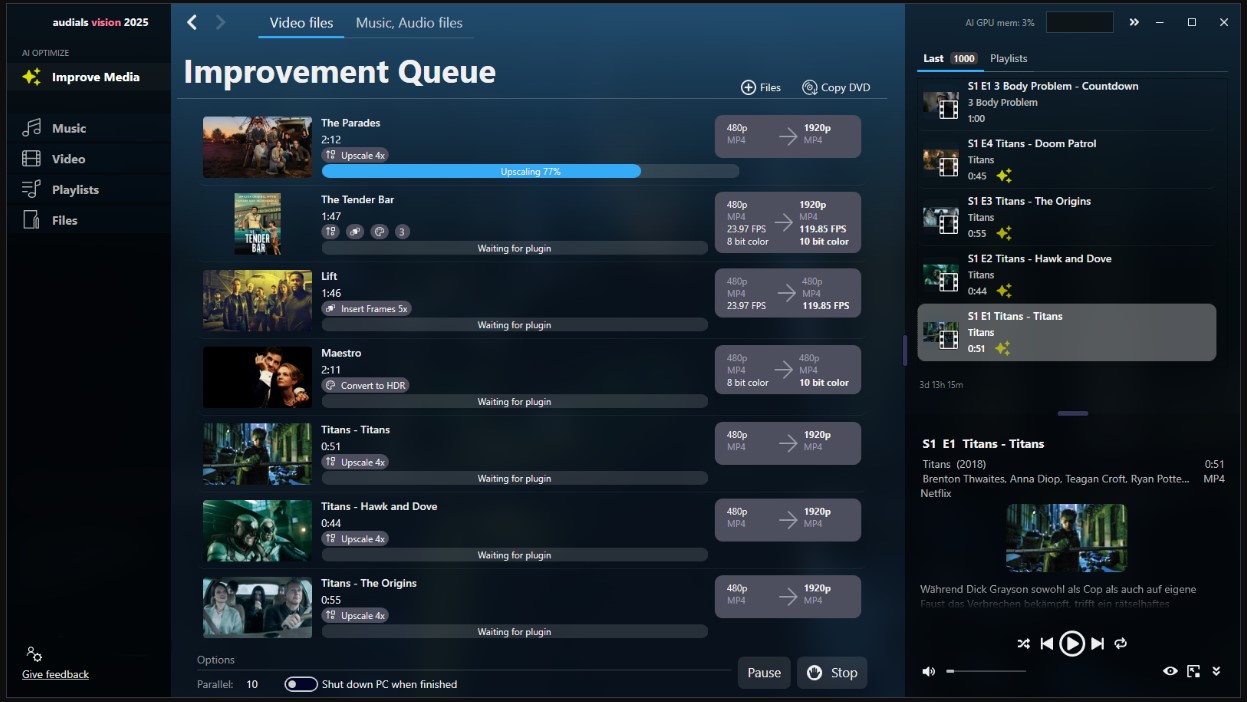
- AI-Powered Upscaling: Increase resolution and pixel detail using AI models that analyze and refine each frame.
- Cloud Acceleration: Offload processing to the Audials cloud to speed up enhancement, especially on low-end PCs.
- Intuitive Interface: Navigate tools with a user-friendly, browser-like UI that’s accessible for beginners.
- Audio Optimization: Improve audio quality alongside video, using AI to reduce noise and boost clarity.
Where to Get Audials Vision 2025 SE
Audials Vision is typically part of the Audials One Premium package, which includes advanced recording and enhancement tools. You can begin with a free trial to test the features before purchasing.
Official downloads and updates are available from Audials’ support and downloads page, which lists the latest installer for Audials Vision and related modules.
Be cautious of third-party sites claiming free lifetime downloads; always prefer the official site or trusted software repositories to reduce the risk of malware or outdated installers.
AI Video Enhancer Software for PC, Feature Comparison
| Feature | Audials Vision 2025 SE | Typical Free AI Enhancer |
|---|---|---|
| Resolution Upscaling | Up to 4K via AI | Limited or capped |
| Cloud Processing | Yes | Rarely |
| Audio Enhancement | Integrated | Typically no |
| Batch Processing | Yes | Limited |
Tips for Enhancing Your Videos
Before enhancing videos with any AI software:
- Use the highest quality original file you have.
- Avoid extreme upscaling from very low-resolution sources.
- Experiment with different AI models to balance speed and detail.
This approach ensures the most natural results and prevents unnaturally sharpened artifacts.
For more tips on video tools and software alternatives, visit trusted tech review sites and software comparisons. (Example: official Windows video enhancement guides and trustworthy digital tool reviews.)
How to Get Audials Vision 2025 SE: Full Version for Free
Audials is giving away Audials Vision 2025 SE for FREE as part of a limited-time promotion. Here’s how to claim your lifetime license:
Step-by-Step Instructions:
- Download the Giveaway Installer
Use the link provided below to download:Audials-Vision-SE-2025file.
Download the new giveaway version from any of these two links: [ Link 1/ Link 2] - Install the Software
Run the installer and follow the setup prompts. - Activate the App
When you launch the app, an activation window will appear.- Enter your name
- Sign in or create a free Audials account
- Click “Activate”
FAQs
Q. Is Audials Vision 2025 SE free to download forever?
A. Audials Vision may be available for trial or a limited free version, but full access typically requires a purchase through Audials One Premium. Official downloads are found on Audials support pages.
Q. What does an AI video enhancer software for PC do?
A. It uses artificial intelligence to increase video resolution, improve clarity, remove noise, and sometimes enhance audio quality too.
Q. Can Audials Vision upscale videos to 4K?
A. Yes, Audials Vision’s AI models can upscale footage to 4K quality, optimizing details and crispness.
Q. Do I need a powerful PC to use Audials Vision?
A. Not necessarily, cloud processing options let you enhance videos even on modest hardware.
Q. Is Audials Vision suitable for beginners?
A. Yes, Audials provides an intuitive user interface, making it accessible even for users without video editing expertise. :contentReference[oaicite:13]{index=13}